Archives: Web Utilities

Google Wave Now Open to ALL

Google Wave

Google’s Lars Rasmussen announced yesterday at Google I/O developer conference that Google Wave is now open to everyone, it no longer requires an invitation. If you have a Google account, simply visit wave.google.com to wave.

“Anyone on a wave can edit or reply to any section, keeping discussion in context with relevant content. Everyone’s typing shows up instantly, and Google Wave lets new participants get up to speed quickly with organized discussions and playback to see how a wave evolved.”

Google Wave is also available in Google Apps, businesses, and organizations now have an extra communication tool.

via [Google Operating System]

Posted in Web Utilities | Comments Off

ReclaimPrivacy Bookmarklet, A Facebook Privacy Scanner

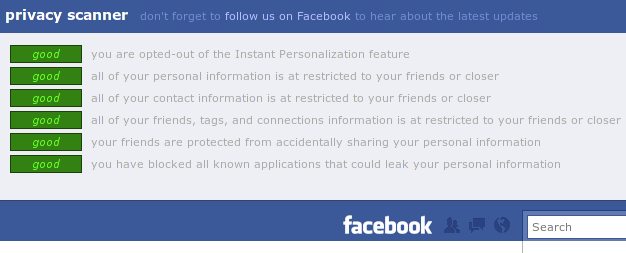
Facebook Privacy Scanner

If you’ve gotten yourself entangled in Facebooks privacy traps and seriously want to know those privacy settings have to be disabled but are currently enabled on your Facebook account, then use this handy bookmarklet from ReclaimPrivacy.org More»

Posted in Web Utilities | 2 Comments »

Linux users need a Microsoft Office license to use Office Web Apps

Microsoft Office Web Apps

Unbelievable but true, Tim Anderson’s ITWriting after a conversation with Jeff Teper (Microsoft’s Corporate VP of the Office Business Platform) reports on his blog that Linux fanbois that want to run Microsoft Office’s Web Apps will need a Microsoft Office license even though the MS Office desktop suite doesn’t run on Linux desktops. More»

Posted in Web Utilities, Windows | 3 Comments »

Drag ‘n’ Drop images into Gmail Messages

Drag 'n' Drop images into Gmail Messages

Gmail has launched a new feature that permits you to drag messages from your computer directly into a Gmail message. Drag, resize it if you want and send the image, so simple a process, no more dialogs to select images as an attachment. This features works only on the Google Chrome web browser, it will soon be extended to other web browsers.
via [Gmail Blog]

Posted in Email, Web Utilities | 1 Comment »

Xmarks Tab Sync now opens Remote Tabs in any Web Browser

Xmarks recently started syncing open tabs across Firefox browsers – Internet Explorer and Chrome also have open-tab sync support. You can now re-open your remote tabs on any device with a web browser, like the iPhone or computer and in any web browser of your choice using Xmarks new web based feature.

To open your synced tabs remotely, launch your browser, log into your account at My Xmarks.com. On the iPhone, you’ll see something like this:
More»

Posted in Browsers, Firefox, Open-Source, Web Utilities | 2 Comments »

Launchpad goes fully Open Source

Launchpad

The Canonical Launchpad team is happy to announce that Launchpad web application and website has been completely open sourced. All components of Launchpad including codehosting and soyuz, now have open codes. Launchpad that counts over 13,000 active projects was developed and maintained by Canonical Ltd. It is released under the GNU Affero General Public license, version 3. For more information on how to be part of it move the Launchpad Blog.

Posted in Open-Source, Web Utilities | 1 Comment »

BitLet – A Web-Based BitTorrent Client with Streaming Video Torrents

BitLet Web-Based BitTorrent Client

BitLet is a web-based BitTorrent client that makes BitTorrent available to the occasional user, and to those who can’t install a regular BitTorrent client like µTorrent or Transmission on their computers. No configuration is needed to use BitLet, just drop-in the URL of the torrent file and you’ll get a pop-up window that shows the download speed, download bar, number of seeders, and a download status led that signals potential problems. (see screenshot above). Anyway if you default settings are not OK for you, then go to BitLet Settings where you can modify BitLet’s incoming connection port and maximum upload rate. More»

Posted in Browsers, Firefox, Open-Source, Web Utilities | Comments Off

Add Official Google Buzz buttons for your Website [No hacks]

Official Google Buzz buttons

Google code has just made it easy for you to add official Google Buzz buttons on your websites without no hacks. ‘Post to Buzz’ and ‘Follow on Buzz’ can be added to your web pages by simply placing a customizable javascript in your HTML, PHP, etc web pages, where you want the buttons to show-up, then reload your web page to make sure you did it correctly. Test by clicking to see the posting box your users will see.
Official Google Buzz buttons are available here; buzz.google.com/stuff. More»

Posted in Open-Source, Web Utilities, WordPress | 1 Comment »

Sync UbuntuOne Contacts with your Mobile Phones

Funambol Mozilla Sync Client

Ubuntu One is testing a new feature that extends the existing Ubuntu One contacts synchronization capabilities to support mobile phones. Before, syncing your contacts via Ubuntu One was limited only to desktops – for example, you could view and edit your Evolution contacts via Ubuntu One. Now with the ‘Mobile Contacts Sync’ service paid Ubuntu One subscribers can keep all of their contacts in sync no matter what device they are using – desktop, laptop, the cloud, and mobile phone. More»

Posted in Email, Open-Source, Ubuntu, Web Utilities, Windows | Comments Off