


GStreamer for Ubuntu,Debian Mp3
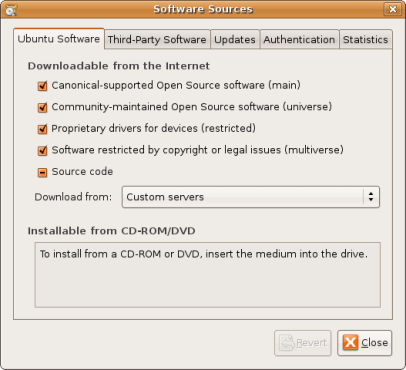
Gnu/Linux Ubuntu does not riproduce MP3 files, this means you’ve got to install it yourself, if not you would not be able to play you’re mp3 files. Ubuntu simply wants to avoclass legal problems in countries where mp3 licence is needed. In the “Synaptic Package Manager” in System/Administration move over to “Settings” then “Repositories”. On the “Ubuntu Software” flap choose all the servers you want to use to download packages. Make sure you select “universe” e/o “multiverse”. Then Close.
In the Synaptic Package Manager click on Search and write down gstreamer0.8-mad package, Then click Search to start searching on the web. At the end of the search select the package and click Apply. You’re done.
9:04 am on August 23rd, 2008
Nothing
1:48 pm on January 28th, 2009
What if dont have an internet connection at my home? Please tell how to download & install.
1:59 pm on January 28th, 2009
@NAYANAJITH; Well,this post is rather old, there are many ways to get mp3 working nowadays – just download VLC media player and install on your box.
2:06 am on October 5th, 2009
Thanks for this. Mp3 music now plays.