

Little Hacks to change the Skin of your Google Chrome Browser
- Fri Sep 5, 2008
- By Martin Kaba
- Filed under: Browsers, Open-Source
- 11 Comments
-

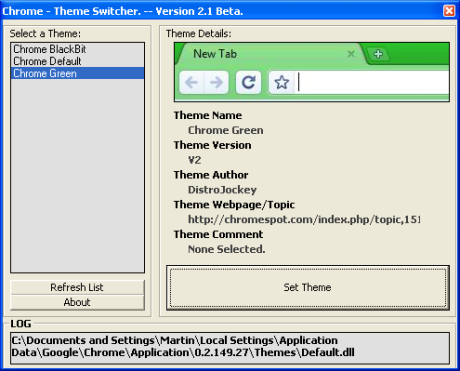
Wow, Google can take all the time it needs before making available API’s or extensions for it new browser Google Chrome, in the mean time on the web, all types of hacks on the Google Chrome are popping up. Recently I found on the ChromeSpot Forum , a so-called Chrome Automatic Theme Switcher. This little application changes the skin of your Google Chrome browser. The application bundles up three ready to use skins — skins, that the author of this application found on the net, so you can make yours. If you find other themes then just place them in \ReleaseV2.1\Themes folder and use the Chrome Automatic Theme Switcher to upload.
The Altaf Sayani blog offers Google Chrome skins in the form of a little default.dll file you’ll have to download and manually configure. Configuring consists of replacing the default deafault.dll file in the
C:\Documents and Settings\User\Local Settings\Application Data\Google\Chrome\Application\0.2.149.27\Themes\ folder for XP users or in the
C:\Users\User\AppData\Local\Google\Chrome\Application\0.2.149.27\Themes\ folder for Vista users.
It might be necessary to change your Folder Options to “Show hidden files and folders” to view this folder.
11:33 am on September 7th, 2008
also you can download 10 more google chrome theme in http://www.freechromethemes.com
1:29 am on September 8th, 2008
[…] Windows only: Less than a week since Google Chrome’s release and hackers are already hard at work releasing tools to tweak the minimalistic browser, and the Automatic Theme Switcher is one of those ways. Install the beta theme switcher on your PC running Chrome to choose one of three skins for Chrome—black, blue (the default), or green—and activate it immediately, without having to manually muck around in Chrome’s installation folders. Alternately, you can manually download Google Chrome themes here (the orange one isn’t available in the Theme Switcher utility just yet). The Automatic Theme Switcher is a free download for Windows only. Chrome Automatic Theme Switcher [Chromespot via Kabatology] […]
1:39 am on September 8th, 2008
[…] 8 september 2008 · Geen reactiesEngels, Hacks, Nieuws Windows only: Less than a week since Google Chrome’s release and hackers are already hard at work releasing tools to tweak the minimalistic browser, and the Automatic Theme Switcher is one of those ways. Install the beta theme switcher on your PC running Chrome to choose one of three skins for Chrome — black, blue (the default), or green — and activate it immediately, without having to manually muck around in Chrome’s installation folders. Alternately, you can manually download Google Chrome themes here (the orange one isn’t available in the Theme Switcher utility just yet). The Automatic Theme Switcher is a free download for Windows only. Chrome Automatic Theme Switcher [Chromespot via Kabatology] […]
1:48 am on September 8th, 2008
[…] Windows only: Less than a week since Google Chrome’s release and hackers are already hard at work releasing tools to tweak the minimalistic browser, and the Automatic Theme Switcher is one of those ways. Install the beta theme switcher on your PC running Chrome to choose one of three skins for Chrome—black, blue (the default), or green—and activate it immediately, without having to manually muck around in Chrome’s installation folders. Alternately, you can manually download Google Chrome themes here (the orange one isn’t available in the Theme Switcher utility just yet). The Automatic Theme Switcher is a free download for Windows only. Chrome Automatic Theme Switcher [Chromespot via Kabatology] […]
2:28 am on September 8th, 2008
[…] Windows only: Less than a week since Google Chrome’s release and hackers are already hard at work releasing tools to tweak the minimalistic browser, and the Automatic Theme Switcher is one of those ways. Install the beta theme switcher on your PC running Chrome to choose one of three skins for Chrome—black, blue (the default), or green—and activate it immediately, without having to manually muck around in Chrome’s installation folders. Alternately, for a bigger selection of skins, you can manually download Google Chrome themes here and install them yourself. The Automatic Theme Switcher is a free download for Windows only. Chrome Automatic Theme Switcher [Chromespot via Kabatology] […]
11:11 am on September 8th, 2008
Just thought you should know that I was the one who hacked together Google Chrome Green Theme. And I have yet to release a v2. (Not sure how you got that screen shot) Currently it’s at v1.3 as can be seen at the following URL: http://chromespot.com/index.php/topic,151.0.html
Thanks for featuring on your site though.
Cheers,
DJ
3:34 pm on September 8th, 2008
[…] Vía | Kabatology […]
3:56 pm on September 8th, 2008
This is great, I also found XChrome Theme Installer while searching for themes.
http://www.megaleecher.net/uploads/XChromeP3_With_Best_Themes_Exclusive.zip
This pack contains all the best themes, no need to mess with separate installers.
6:00 pm on September 9th, 2008
[…] Google Chrome?????????0.2.149.29???????????????????????????????????????Google Chrome?Windows XP?????????????????Chrome Automatic Theme Switcher(?????0.2.149.27????????????????????????Google Chrome??????skins)?????????Google Chrome????????????????ChromeSpot???????????? […]
2:40 am on September 18th, 2008
[…] Windows only: Less than a week since Google Chrome’s release and hackers are already hard at work releasing tools to tweak the minimalistic browser, and the Automatic Theme Switcher is one of those ways. Install the beta theme switcher on your PC running Chrome to choose one of three skins for Chrome—black, blue (the default), or green—and activate it immediately, without having to manually muck around in Chrome’s installation folders. Alternately, for a bigger selection of skins, you can manually download Google Chrome themes here and install them yourself. The Automatic Theme Switcher is a free download for Windows only. Update: If you’re running the latest version of Google Chrome—0.2.149.29—the switcher does not work; you have to go the manual route. Apologies! Chrome Automatic Theme Switcher [Chromespot via Kabatology] […]
8:56 pm on November 9th, 2008
[…] Windows only: Less than a week since Google Chrome’s release and hackers are already hard at work releasing tools to tweak the minimalistic browser, and the Automatic Theme Switcher is one of those ways. Install the beta theme switcher on your PC running Chrome to choose one of three skins for Chrome—black, blue (the default), or green—and activate it immediately, without having to manually muck around in Chrome’s installation folders. Alternately, for a bigger selection of skins, you can manually download Google Chrome themes here and install them yourself. The Automatic Theme Switcher is a free download for Windows only. Update: If you’re running the latest version of Google Chrome—0.2.149.29—the switcher does not work; you have to go the manual route. Apologies! Chrome Automatic Theme Switcher [Chromespot via Kabatology] […]