


Run Linux Live CDs On Windows with MobaLiveCD
MobaLiveCD is a QEMU (a generic open source emulator and virtualizer) based stand-alone emulator, that lets you run Linux Live CDs on Windows without the need of any Windows configuration or extra hardware.
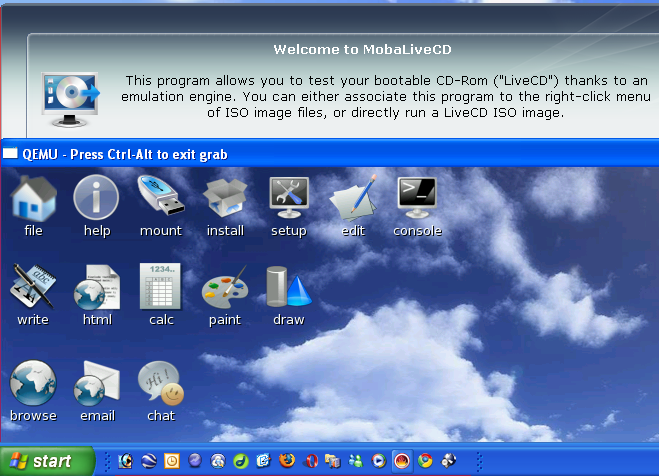
Its portability — it takes just about 1.6MB of your hard/flash drive, together with its intuitive interface makes it rather easy-to-use. With the emulator running all you have to do is point it to your downloaded ISO image to get the Linux OS on Windows. MobaLiveCD also has a right-click function, installed, it lets you launch ISO images with the right-click menu.
Authors Note: I tested MobaLiveCD on Windows XP sp2, with Puppy Linux; Xvesa, using a non-admin account, it loaded this small Linux OS in no time without any issues, but browsing was rather too slow, or almost impossible.
12:29 pm on September 23rd, 2008
After AndLinux here comes another Linux on windows app.
12:40 pm on September 23rd, 2008
Nice tool for running livecds and iso files.
8:50 am on September 24th, 2008
Yes, but it is only an emulation.
I think virtualization tools are quicker.
For example: http://www.virtualbox.org, which is free for personal use.
10:20 am on September 24th, 2008
@ H_I. thanks for the addition.
MobaLiveCD is an emulator and emulators are handy when you want to run an operating system or program from a completely different system on your machine, like Super Nintendo on your PC, but often emulators are slower,as they can really replace hardware.
If you want to run multiple OS on your system simultaneously, then Virtualization is the best choice and VirtualBox is the most user-friendly available. On my PC-laptop I run Ubuntu Hardy as host, and Windows Xp + Puppy Linux on VirtualBox as guest.