


VLC Media Player to get Community-Built Extensions starting Version 1.1
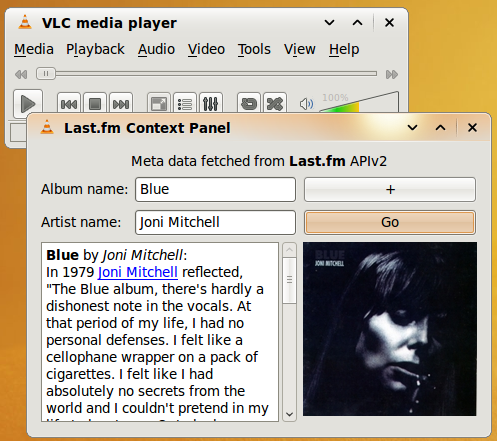
That Mozilla Firefox is a model to copy is well known, but I guess manydid not expect the open source media player VLC, one of the best media players around to get community-built extensions just like Firefox. Well, a VideoLan player builder announced a complete overhauling of VLC codes to permit the implementation of community-built extensions come version 1.1. Developers will use Lua – a lightweight scripting language to create their extensions for VLC.
Like any “serious” platform they are already a few show-off plug-ins to wet your appetite.
– IMDb: read the plot summary, learn about the cast of a movie and get a direct link to the Internet Movie Database.
– Last.fm: Read useful information fetched from the artist’s page on Last.fm.
– Lyrics: Automatically get the lyrics of the current song.
– Subtitles: Find and insert subtitles on top of the video in two clicks.
Grab these extensions Here
Windows users can search the web for vlc-1.1.0-git builds, whilst Ubuntu Karmic users can use this ppa:nilarimogard/webupd8 (via Web Upd8) to upgrade to an unstable VLC 1.1 – at your own risk.
sudo add-apt-repository ppa:nilarimogard/webupd8

sudo apt-get update && sudo apt-get dist-upgrade
After upgrading, drop the lua scripts you want to try in your VLC scripts folder:
Linux: ~/.local/share/vlc/lua/extensions/
Windows: %APPDATA%\VLC\lua\extensions
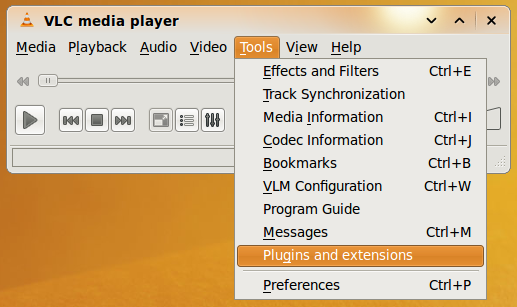
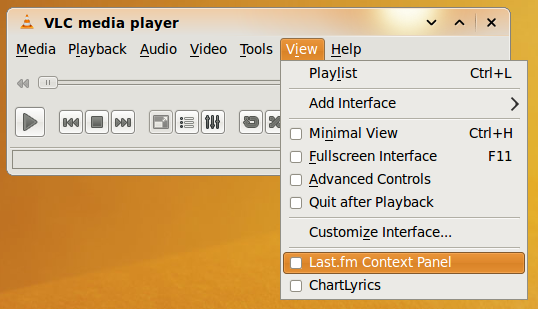
Do Tools -> Plug-ins and extensions, to view your installed extensions and reload them. To launch an extension go to the View menu (see second from the top screenshot).
More here ~ via Extensions in VLC