


Firefox extension – DownloadHelper

DownloadHelper is a Firefox extension offers and easy and alternative way to download your favourite video from sites like MySpace, Google video, DailyMotion, YouTube etc. It also extracts audio and picture galleries.
DownloadHelper signals to you with an animated icon  what video you could download; by simply clicking on the menu beside the DownloadHelper icon. If you find yourself on a page with a video you could instantly download that video using the menu of DownloadHelper.
To install DownloadHelper, you need to follow the famous three step process for installing Firefox plugins.
1. Get the Firefox extension DownloadHelper
2. If you have default security settings on your browser, you should be asked for a “permit” to use this extension. After adding this site to the list of Trusted sites, click Install Now.
3. Once successfully installed, you’ll be asked to Restart Firefox.
You’re now reader to start downloading
For a faster download you are advised to download files one by one, even though multiple download is possible and naturally bandwidth consuming.
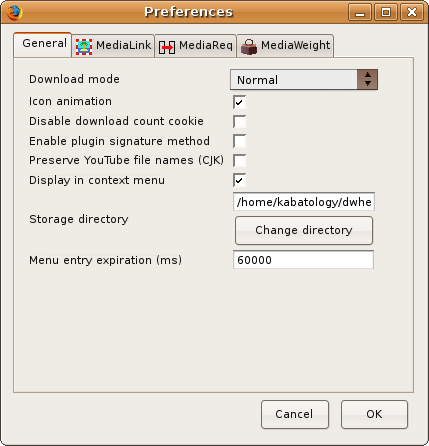
You could tweak it further by going to the Preferences dialog (Tools > Add-ons > DownloadHelper or from Tools > DownloadHelper > Preferences) where you can change; the default download folder, the media size threshold, the Download mode (decclasses whether downloads should start immediately after being initiated or are queued and executed one after the other to save bandwidth.) amongst many others.
Under tabs: MediaLink and MediaReq. you could add or delete file formats you consider necessary or not for download.
DownloadHelper is now at version 2.5.2 – released on 6 December 2007. It is compatible with Firefox: 1.5 – 3.0b1